
The short answer
Build each listing from an approved saleable configuration, not from the most attractive features across a product family. Link claims to supporting evidence, distinguish included and optional accessories, and compare images, text and variant settings before publication. Keep historical listing versions connected to the stock they describe.
Introduction
A product page shows a vacuum with two batteries, the specification sheet lists one, and the warehouse ships a bundle with a single battery plus a wall mount. Each team may have used a genuine supplier file. The failure is that the files describe different saleable configurations while appearing to describe one product.
Accurate cleaning-appliance listings begin with a controlled definition of what the customer will receive. Claims, images, accessory counts, variant settings and setup instructions should all refer to that definition. A polished listing cannot compensate for an unresolved bundle or a performance statement copied from another model in the range.
This proposed workflow helps importers prepare product data for retailers and their own stores. It is not a claim about RoboMeka's sales performance, a guarantee of platform approval or a replacement for current marketplace requirements. Use it after defining the product through the private-label customization process, and before releasing customer-facing material.
Establish one saleable configuration for each listing
Create a configuration record that identifies the appliance, market version, included accessories, consumables and documents. Specify whether the dock, battery, charger, water tank or optional kit is included. Avoid descriptions such as standard accessories unless the exact contents are defined elsewhere and remain accessible to the people preparing the listing.
Separate the supplier's model family from the item the customer can buy. A family may contain different colours, docks or attachments, while a saleable SKU represents one defined offer. Listing writers should not assemble a composite product using the longest runtime, largest accessory set and most advanced software feature available anywhere in that family.
Assign a data owner and an approval status. Draft information can be useful during planning, but it should be visibly different from released facts. A shared folder called final is not enough when several departments can replace its contents without identifying who approved the new version or which stock it describes.
Describe variants through their differences
For each variant, state exactly what changes and what remains common. A colour option might share the same bundle, while a premium configuration may include a different dock. Do not make shoppers discover that a selected image, specification or package list applies only to another variant after they have completed the order.
If two configurations cannot be represented clearly within the chosen listing interface, discuss a different presentation with the retailer. The convenience of one combined page should not override a meaningful product distinction. Test the customer-visible result, including the default selection and the behavior after switching variants.
Build a claims register before writing sales copy
List each proposed factual claim with its supporting evidence, applicable configuration and necessary conditions. The register can be modest: a controlled table linking the wording to a document or approved observation. Its purpose is to make review possible, not to produce a second marketing brochure filled with the same unqualified statements.
Distinguish a product feature from an outcome. A removable tank is a feature that can be checked against the sample. A claim that the machine makes maintenance effortless is a broad judgment requiring a different basis. Replace vague promises with concrete information about the routine the owner needs to perform.
Performance claims need particular care. Runtime, pickup, noise and coverage figures may depend on operating conditions. Keep those conditions with the approved wording and have a qualified reviewer confirm that the evidence applies to the ordered configuration. Do not add numerical precision merely because a retailer's template provides a box for a number.
| Data field | Source to reconcile | Common mismatch to prevent |
|---|---|---|
| Product and variant name | Released configuration record | A family name hiding different bundles |
| Included items | Packing specification and approved sample | Optional accessories presented as included |
| Performance statement | Relevant evidence and conditions | A result transferred from another mode or model |
| Product photograph | Approved physical configuration | Prototype features shown on production listings |
| Setup requirement | Current instructions and market review | Missing dock space, network or site preparation |
| Maintenance information | Approved owner guidance | Consumable care presented as maintenance-free operation |
| Compatibility statement | Specific approved combinations | Similar-looking parts described as interchangeable |
Make included, optional and replacement items unmistakable
Show the complete included bundle in a clear contents view and describe optional items separately. An accessory used to demonstrate a scenario can create an expectation even when the caption says optional elsewhere. Review the overall impression of the image sequence, not just whether a technically correct disclaimer exists on the page.
Define counts carefully. A robot vacuum might contain an installed bag and an additional spare, or a single bag only. Describe the actual package without making the reader infer whether the installed item is included in the stated quantity. The same issue applies to filters, mop pads, rollers and mower blades supplied for later replacement.
Google's bundle attribute guidance distinguishes retailer-created bundles from manufacturer-defined bundles. Its multipack guidance concerns retailer grouping of identical products. Check the current requirements for the actual sales channel; an appliance accessory count is not automatically a multipack value.
Those platform definitions do not replace the physical packing specification. A correct data-feed attribute still cannot fix a missing charger or an image showing the wrong dock. Treat feed formatting as one downstream use of approved product information, not as the source of truth for what production must pack.
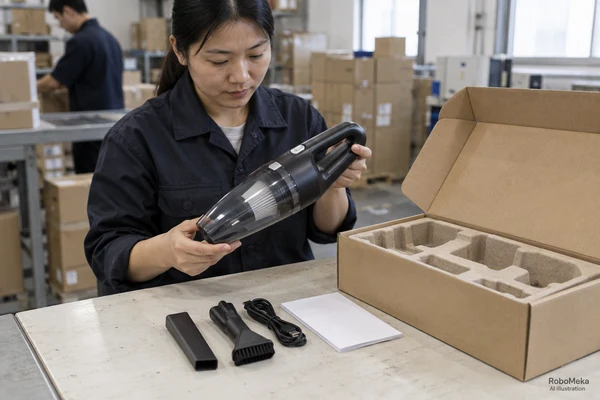
Photograph the approved product, not an aspirational version
Use production-representative samples wherever the image is presented as depicting the product sold. Record the sample identity and configuration used in the photography session. If a prototype is used during development, keep those assets clearly separated until the visible differences are resolved and the appropriate reviewers approve their use.
Check details that are easy to overlook in a polished image: connector shape, tank markings, button layout, supplied plug and accessory finish. A photo can remain attractive while becoming inaccurate after a design change. Retouching should not introduce features, remove relevant controls or imply a different level of protection or capability.
Keep illustrative scenes separate from evidence
An illustrative scene can explain a product application, but it should not be presented as a documented customer project or factory test. In particular, generated images are not proof that a configuration exists or works in the pictured environment. Verify both the visual accuracy and the applicable channel's image requirements before publication.
For a private-label launch, send your target channels and product-data requirements, including the intended bundle and available evidence. The useful next step is to agree which facts and assets can be released, rather than filling every template field with an assumed specification.
Explain application fit and preparation where customers need it
State the surfaces or settings for which the exact product is intended, using approved instructions and evidence. A household vacuum should not acquire a commercial or hazardous-dust claim because a broad lifestyle photograph suggests a workshop. A pool robot's suitability should not be inferred solely from an attractive image of a large swimming pool.
Place important preparation information near the relevant feature. A connected robot may need a supported setup process; a mower may need site preparation; a dock may require usable space for operation and maintenance. Present confirmed requirements in understandable language and distinguish them from optional accessories or services sold separately.
Avoid a promise that a product works everywhere. Buyers can describe appropriate applications and meaningful limits without making the page negative. Accurate fit information helps the customer decide whether the product belongs in their home or facility and gives customer-service staff a consistent basis for answering pre-sale questions.
Review software and connected-feature descriptions separately
Software behavior can change independently of packaging. Identify which features require an app, account, supported network or particular hardware configuration. Do not assume that a capability shown in a supplier demonstration is available in every destination market, app version or private-label implementation.
Ask who owns the customer-facing wording when a feature changes. A software release may alter setup screens, permissions or the way a cleaning routine is selected. The private-label app checklist addresses broader software sourcing questions; the listing review should ensure that the public promise matches the version actually supported for the offer.
If a future feature is not released, do not describe it as a current capability. A roadmap statement needs separate handling and appropriate approval; it should never be used to fill a gap in the current product specification. Buyers should be able to understand the present offer without relying on a promised update.
Keep market versions and translations aligned
A translated listing must describe the destination configuration, not merely translate the source-language page. Check charger or plug references, available functions, included documents and measurement units where relevant. A linguistically accurate translation can still be commercially inaccurate when it describes a bundle that is not being shipped to that market.
Use a controlled terminology list for product parts and operations. The name used for a tank, station or filter should remain understandable across the listing, manual and support materials. The multilingual manual workflow offers a related approval structure, while the listing owner should focus on what a buyer sees before purchase.
Route destination-specific legal and conformity wording to qualified reviewers. Do not copy a certification statement from another region or turn an internal test reference into a general approval badge. If the evidence is not available for the exact offer, leave the claim unapproved instead of guessing that an apparently similar model has the same status.
Test the rendered page and the product-data feed together
Review the live or staging presentation as a customer would encounter it. Check titles, image sequence, selected variant, contents, specifications and important limitations. A spreadsheet approval is useful, but the retailer may truncate text, rearrange fields or show a default image that changes the meaning of the information.
Compare desktop and mobile views, especially where tables or variant labels are shortened. Ensure that a condition attached to a performance claim remains visible and understandable. Avoid relying on a distant accordion or a tiny image caption to correct an otherwise misleading headline.
Check downstream data exports against the same approved source. A retailer feed, comparison-shopping entry and product page should not each maintain a separate uncontrolled version of the bundle. Automated synchronization can help, but it also spreads errors quickly; test representative changes before assuming every channel receives them correctly.
Record the released version, not only the latest file
Keep a dated record of the approved text, images and configuration reference. Identify the channels and stock to which it applies. This history matters when a customer purchased before a listing update or when a marketplace continues displaying an older asset after the source file has changed.
Manage substitutions without silently changing the offer
Suppose a hypothetical repeat shipment uses an approved replacement floorhead. The revised component may be suitable, but the old photography and accessory description still need review. Technical acceptance of the substitution does not automatically approve every customer-facing statement associated with the previous version.
Determine how old and new stock will be sold and supported. If a customer may receive either version, the listing needs an accurately reviewed approach rather than an ambiguous image selected for convenience. Where the difference materially affects the offer, discuss separate inventory or listing treatment with the responsible retailer and product team.
Use the change-control guide to connect supplier revisions with internal approvals. Add the listing owner to the notification route. Otherwise purchasing may approve the new configuration while marketing, customer support and warehouse staff continue using the old definition.
Turn customer questions into targeted corrections
Group recurring pre-sale questions and returns by the information customers struggled to understand. Examples might include whether a dock is included, how many replacement filters are supplied or which floor types are intended. Investigate the actual listing presentation before assuming that customers simply failed to read it.
Separate a data error from a product limitation. If the listing promises an accessory that was never part of the approved bundle, correct the offer and handle affected customers through the appropriate process. If the product cannot perform the desired task, rewriting the page should clarify fit rather than disguise that limitation.
Avoid using a small set of comments to invent a broad satisfaction statistic. Customer feedback can identify a question worth investigating without proving a population-wide result. Keep the proposed correction specific, review it against the product evidence and check whether the revised page resolves the original ambiguity.
Prepare a concise retailer handover package
Provide the released configuration record, approved copy, image set, contents list and relevant setup or care notes in an agreed format. Include contact ownership for technical questions and a clear method for receiving updates. A retailer should not need to choose between conflicting supplier presentations to create a credible page.
Identify any missing data as pending, with a named reviewer and next action. A launch deadline does not make an unverified specification reliable. The handover is complete when the retailer can identify what may be published and what remains unresolved, not merely when a folder contains enough files to look comprehensive.
Frequently asked questions
Can one listing cover several appliance bundles?
It can if the channel supports clear variant selection and each option accurately displays its own contents, images and relevant specifications. Test the customer-visible behavior rather than assuming the backend setup is sufficient. If meaningful differences cannot be communicated reliably, discuss a separate listing or another clearer presentation with the retailer.
Should optional accessories appear in the main product image?
Review the channel's current requirements and the overall impression created for the shopper. An optional item shown prominently can be mistaken for included equipment. Keep the saleable bundle unambiguous and describe separately sold accessories clearly. A small disclaimer should not be expected to repair an image sequence that communicates the wrong package.
Can buyers reuse a supplier's performance claim unchanged?
Only after establishing that the supporting evidence and conditions apply to the exact configuration being offered. Review the operating mode, accessories and any important limitation. A claim for a different model or market is not automatically transferable. Keep the approved wording linked to its evidence so later product changes trigger review.
Does a correct Merchant Center feed guarantee visibility or sales?
No. Accurate data supports a truthful representation of the offer but does not guarantee platform approval, search placement, traffic or conversion. Requirements and account circumstances also matter. Treat the feed as one part of a broader product-data process and avoid presenting technical completeness as a promise of commercial performance.
When should a listing be reviewed again?
Review it when the configuration, supplied accessories, software behavior, instructions or supporting evidence changes, and when customer feedback reveals a meaningful ambiguity. Keep a regular ownership process as well. Preserve prior versions for context instead of overwriting the history needed to understand what earlier customers were shown.
Conclusion
A reliable listing is the public expression of an approved product configuration. Connect every important statement and image to that configuration, verify the rendered presentation and maintain the connection when stock or software changes. Clear information helps buyers understand the actual offer without relying on optimistic assumptions.
For a RoboMeka launch discussion, send your intended bundle, destination market and retailer data template. These details provide a practical starting point for agreeing product information, available assets and the unresolved questions that must be answered before publication.